Bus Tracker
Live school bus tracking for parents.
The driver runs the route on their iPhone. Parents watch the bus move on a live map and get told when it is nearly at their stop. Nobody has to text "where are you".
Free on the App Store
What it does
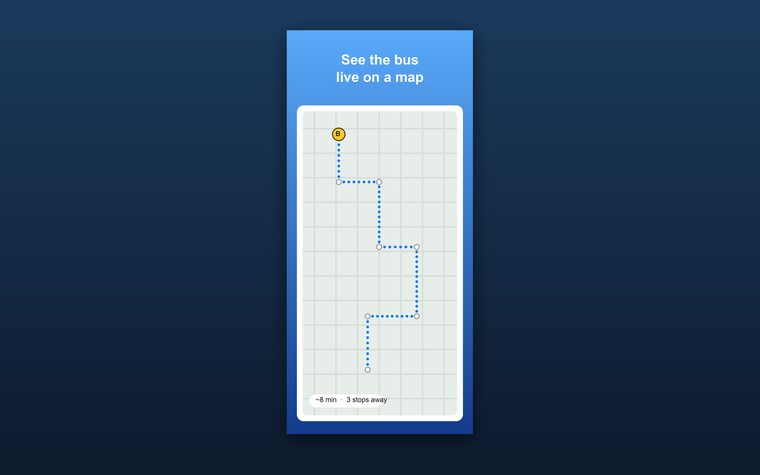
A live map
Parents watch the bus move along the route while a run is going.
Almost here
A push lands when the bus is a set number of minutes or stops from your child's stop, so nobody stands outside for ten minutes.
Pick-up and drop-off alerts
Told when your child gets on, and told when they get off, with where it happened.
Lock screen and Dynamic Island
Follow the bus and the arrival time without opening the app.
Join with a code
The driver shares one code. Parents type it, add their child and pick a stop. The driver approves every parent.
Share a live link
Drivers can share a live link that parents open in a browser. No app needed. The driver approves each person first.
Build the route once
Add stops by hand or import them from a photo of the route sheet. Stops are mapped along real roads.
QR tags or a tap
The driver scans a child's QR tag at the door, or taps their name on the roster. Only the driver of that bus can record it.
Not riding today
Parents switch a child off for the day, so the driver knows not to wait.
Driver updates
The driver sends one message, like "running 15 minutes late", to every parent on the bus.
Only the driver shares location
Parents are never asked for theirs, and the bus is shared only while a run is going.
How it works
For drivers
- Create a bus. Name it and get a 6-character join code.
- Add the route. Photograph the route sheet or type the stops. The app maps them along real roads.
- Invite parents. Share the join code, or a live link parents open in a browser. Approve each parent as they ask to join.
- Start a run. Tap Start. The bus shows on the parents' map until you end the run.
For parents
- Get the app. Download Bus Tracker free from the App Store.
- Join the bus. Enter the code from the driver, then wait for the driver to approve you.
- Add your child. Type their name and pick their stop on the map.
- Pick your alerts. Picked up, dropped off, minutes before, or stops before. Turn on the lock screen tracker if you like.
Questions
How can I track my child's school bus on my phone?
Install Bus Tracker on your iPhone and join your child's bus with the code the driver gives you. While the driver runs the route, you see the bus on a live map, how many stops and minutes away it is, and you get a push when it is almost at your stop.
Is Bus Tracker free?
Yes. Bus Tracker is free on the App Store for drivers and parents, with no ads.
Do I need an account?
No. There is no login. The app makes an anonymous account for your phone the first time you open it, with no email and no password.
Does my school or bus company have to sign up?
No. Any driver, bus aide or group organizer can create a bus in the app. The driver's iPhone is the tracker, so no GPS box or district contract is needed.
How do parents join a bus?
The driver creates the bus and shares its 6-character code. A parent enters the code in the app, adds their child and picks the child's stop. The driver approves every parent before they can see the bus.
Can parents see the bus without the app?
Yes. Drivers can share a live link that parents open in a browser, no app needed. The parent types their name and their child's name, and the driver approves them. They then see the bus on a map while a run is going. For pick-up and drop-off alerts, parents use the app.
Who can see where the bus is?
Only people the driver approved, and only while the driver has a run going. The location comes from the driver's phone. Parents never share their location.
How is my child's information protected?
The driver approves every parent before they see anything. A child's name, optional photo and stop are shown only to members of that bus. A child's QR tag holds only a random code, and only the driver or co-driver of that bus can record a scan, so a copied or photographed tag is useless to anyone else. There is no advertising, no tracking across apps, and nothing is sold.
Why would the driver ask me to verify my ID?
It is an optional check a driver can require for their bus, to confirm who you are and that you live near the route. Didit (didit.me), an identity verification service, runs it: you take a photo of your driver's license, ID card or passport and a selfie in Didit's secure screen. Bus Tracker keeps only the name on the ID, the city, state and ZIP, the last 4 characters of the document number, the document type, the expiry date, the result, and the distance from the ID address to the nearest stop. We never keep the ID photo, the selfie, your date of birth or your street address. Only the driver of that bus sees this record, and deleting your account deletes it.
How accurate are the arrival times?
The app learns how long the bus takes between stops from earlier runs. Before it has learned the route, it estimates from the distance left.
Does it work for carpools, camps and church or community buses?
Yes. It works for any group route with a driver and regular stops: school buses, vans, camps, shuttles and carpools.
Does the driver have to keep the app open?
No. During a run the app keeps sharing the bus location in the background. It stops when the driver ends the run.
Is there an Android version?
Not yet. Bus Tracker is for iPhone today.
I am not getting alerts.
Check that notifications are on for Bus Tracker in iOS Settings, that your child is assigned to a stop, and that your alert choices are switched on for that child.
How do I delete my data?
In the app, open Settings and tap Delete account. That removes your account, your children and any bus you run. You can also email us.